JSON File for Object Models
JSON is a file that stores simple data structures and objects. It contains data in a standard data interchange format which is lightweight, text-based, and human-readable. The file imported by the object model importer must contain all the data needed to create the WinCC OA Data Point Types and to configure the related object models (Type Functions).
The elements contained in the JSON file can be mandatory or optional. The mandatory elements must be specified for the first import as well as in case of any subsequent re-import. Instead, if the optional elements are not specified:
- In case of a first import, the default values are assumed.
- In case of subsequent re-import, the previous values remain unchanged.

Also, it is not possible to create, configure, or export these DPTs. Even in case they are referenced, they are not correctly exported.
The file must contain the list of the Data Point Types to be created. Specifically, the file contains an element (property) named DPTData containing an element named DPTS that is a list of Data Point Type descriptions.
Example:
{
"DPTData": {
"DPTS": [ ...<list of DPTs description>...]
}
}
For each Data Point Type to be created, it is necessary to specify the following data:
Data Point Type Data | ||
Data | Use | Description |
Name | Mandatory | Value used as name of the WinCC OA Data Point Type. NOTE: This name must be a unique value in the database instances names. |
DPES | Mandatory | List of Data Point Elements. For details, see Table Data Point Element. |
Example:
{
"DPTData": {
"DPTS": [
{
"Name": "Test_NormalPoint",
"DPES": [ ...<list of DPEs description>... ]
}
]
}
}
For each Data Point Element to be created, it is necessary to specify the following data:
Data Point Element Data | ||
Data | Use | Description |
Name | Mandatory | Value used as name of the WinCC OA Data Point Element, NOTE: This name must be a unique value in the DPT (or internal structure). |
PvssType | Mandatory | An object describing the data type of the element. For details, see Table Data Point Element Data – PvssType. |
PVSSTYPE Object
The PVSSTYPE object describes the data type of the element. It is necessary to specify the following:
Data Point Element Data – PvssType | ||
Data | Use | Description |
PvssType | Mandatory | String representing the data type of the element.
For details about the acceptable values, see Table Element Types. |
Ref | Mandatory, in case the element is a reference. | Name of the referenced data point type. |
DPES | Mandatory, in case the element is a structure or a set. | List of internal DPEs description. |
Status | Optional | Object representing an extension of the PvssType configuration. The content of this object depends on the PvssType specified. For details, see Table Data Point Element Status. The empty object (“Status”: { }) resets data. |
ArrayAttributes | Optional | Object representing an extension of the PvssType configuration. The content of this object depends on the PvssType specified and is valid only in case of arrays. For details, see Table Data Point Element ArrayAttributes. The empty object (“ArrayAttributes”: { }) resets the data. |
Example:
{
"DPTData": {
"DPTS": [
{
"Name": "Test_NormalPoint",
"DPES": [
{ "Name": "Char_Value", "PVSSTYPE": { "PvssType": "CHAR" } },
{ "Name": "UInt_Value", "PVSSTYPE": { "PvssType": "UINT" } },
{ "Name": "Enum_Value", "PVSSTYPE": { "PvssType": "UINT" } },
{ "Name": "Int_Value", "PVSSTYPE": { "PvssType": "INT" } },
{ "Name": "Float_Value", "PVSSTYPE": { "PvssType": "FLOAT" } },
{ "Name": "Bool_Value", "PVSSTYPE": { "PvssType": "BOOL" } },
{ "Name": "Bit32_Value", "PVSSTYPE": { "PvssType": "BIT" } },
{ "Name": "Duration_Value", "PVSSTYPE": { "PvssType": "UINT" } }
]
}
]
}
}
Element Types | |
Type String | Description |
STRUCT | Structure |
CHAR | Character |
UINT | Unsigned Integer |
INT | Integer |
FLOAT | Double |
BOOL | Boolean |
BIT | Bit Pattern |
STRING | Text |
TIME | Data-Time |
DPID | Data Point Instance Reference |
LANGSTRING | Multilanguage Text |
BLOB | Blob |
REF | Reference to another existing Data Point Type |
ARRAYCHAR | Dynamic Array of Characters |
ARRAYUINT | Dynamic Array of Unsigned Integers |
ARRAYINT | Dynamic Array of Integers |
ARRAYFLOAT | Dynamic Array of Doubles |
ARRAYBOOL | Dynamic Array of Booleans |
ARRAYBIT | Dynamic Array of Bit Patterns |
ARRAYSTRING | Dynamic Array of Texts |
ARRAYTIME | Dynamic Array of Data-Time values |
ARRAYDPID | Dynamic Array of Data Point Instance References |
ARRAYLANGSTRING | Dynamic Array of Multilanguage Texts |
ARRAYBLOB | Dynamic Array of Blob values |
SETCHAR | Set of Character Elements |
SETUINT | Set of Unsigned Integer Elements |
SETINT | Set of Integer Elements |
SETFLOAT | Set of Double Elements |
SETBOOL | Set of Boolean Elements |
SETBIT | Set of Bit Pattern Elements |
SETSTRING | Set of Text Elements |
SETTIME | Set of Date-Time Elements |
SETDPID | Set of Data Point Instance Reference Elements |
SETLANGSTRING | Set of Multilanguage Text Elements |
SETBLOB | Set of Blob Elements |
It is also possible to define in the JSON file some mandatory Data Points Elements that must be added to all the Data Points Types created.
In this case, the syntax to be used is the same as for the standard Data Point Type, but the name of the Data Point Type must be an asterisk (*).
Example:
{
"DPTData": {
"DPTS": [
{
"Name": "*",
"DPES": [
{ "Name": "MyMandatoryFields", "PVSSTYPE": { "PvssType": "REF", "Ref": "_GmsMyMandatoryFields" } }
]
},
{
"Name": "Test_NormalPoint",
"DPES": [
{ "Name": "Char_Value", "PVSSTYPE": { "PvssType": "CHAR" } },
{ "Name": "UInt_Value", "PVSSTYPE": { "PvssType": "UINT" } },
{ "Name": "Enum_Value", "PVSSTYPE": { "PvssType": "UINT" } },
{ "Name": "Int_Value", "PVSSTYPE": { "PvssType": "INT" } },
{ "Name": "Float_Value", "PVSSTYPE": { "PvssType": "FLOAT" } },
{ "Name": "Bool_Value", "PVSSTYPE": { "PvssType": "BOOL" } },
{ "Name": "Bit32_Value", "PVSSTYPE": { "PvssType": "BIT" } },
{ "Name": "Duration_Value", "PVSSTYPE": { "PvssType": "UINT" } }
]
}
]
}
}
As every Data Point Type must have references to _GmsRelatedItems and _GmsStatusPropagation, those references – if not present in the file - are automatically added during the import and it is not necessary to declare them in the JSON file.
Also, the property SuppressAlarms is automatically added, if not present in the JSON file, and in this case, it is configured with the standard configuration data. If it is necessary to set different values, with respect to the default ones, the property SuppressAlarms must be explicitly added to the JSON file.
Example JSON File for Object Models with the Same Data Point Types Configuration as the CSV file
The following sample is to be intended as an example of file and not as a template. If you want to make a copy of it and create your own file to import, verify its content carefully and enter the data point types that you want to create. In particular, pay attention to the mandatory DPEs section.
{
"DPTData": {
"DPTS": [
{
"Name": "*",
"DPES": [
{ "Name": "MyMandatoryFields", "PvssType": { "PvssType": "REF", "Ref": "_GmsMyMandatoryFields" } }
]
},
{
"Name": "Test_NormalPoint",
"DPES": [
{ "Name": "Char_Value", "PvssType": { "PvssType": "CHAR" } },
{ "Name": "UInt_Value", "PvssType": { "PvssType": "UINT" } },
{ "Name": "Enum_Value", "PvssType": { "PvssType": "UINT" } },
{ "Name": "Int_Value", "PvssType": { "PvssType": "INT" } },
{ "Name": "Float_Value", "PvssType": { "PvssType": "FLOAT" } },
{ "Name": "Bool_Value", "PvssType": { "PvssType": "BOOL" } },
{ "Name": "Bit32_Value", "PvssType": { "PvssType": "BIT" } },
{ "Name": "Duration_Value", "PvssType": { "PvssType": "UINT" } }
]
},
{
"Name": "Test_PointWithRef",
"DPES": [
{ "Name": "String_Value", "PvssType": { "PvssType": "STRING" } },
{ "Name": "Time_Value", "PvssType": { "PvssType": "TIME" } },
{ "Name": "DpId_Value", "PvssType": { "PvssType": "DPID" } },
{ "Name": "LangString_Value", "PvssType": { "PvssType": "LANGSTRING" } },
{ "Name": "Blob_Value", "PvssType": { "PvssType": "BLOB" } },
{ "Name": "Reference_Value", "PvssType": { "PvssType": "REF",
"Ref": "_Gms_TestReference" } }
]
},
{
Name": "Test_PointWithStruct",
"DPES": [
{
"Name": "Struct_Value",
"PvssType": {
"PvssType": "STRUCT",
"DPES": [
{ "Name": "Int_Value", "PvssType": { "PvssType": "INT" } },
{ "Name": "String_Value", "PvssType": { "PvssType": "STRING" } },
{
"Name": "Struct_Internal",
"PvssType": {
"PvssType": "STRUCT",
"DPES": [
{ "Name": "Float_Value", "PvssType": { "PvssType": "FLOAT" } },
{ "Name": "Reference_Value", "PvssType": { "PvssType": "REF",
Ref": "_Gms_TestReference" } }
]
}
}
]
}
}
]
},
{
"Name": "Test_PointWithArray",
"DPES": [
{ "Name": "ArrChar_Value", "PvssType": { "PvssType": "ARRAYCHAR" } },
{ "Name": "ArrUInt_Value", "PvssType": { "PvssType": "ARRAYUINT" } },
{ "Name": "ArrInt_Value", "PvssType": { "PvssType": "ARRAYINT" } },
{ "Name": "ArrFloat_Value", "PvssType": { "PvssType": "ARRAYFLOAT" } }
]
},
{
"Name": "Test_PointWithSet",
"DPES": [
{
"Name": "SetChar_Value",
"PvssType": {
"PvssType": "SETCHAR",
"DPES": [
{ "Name": "Char1", "PvssType": { "PvssType": "CHAR" } },
{ "Name": "Char2", "PvssType": { "PvssType": "CHAR" } }
]
}
},
{
"Name": "SetUint_Value",
"PvssType": {
"PvssType": "SETUINT",
"DPES": [
{ "Name": "UInt1", "PvssType": { "PvssType": "UINT" } },
{ "Name": "UInt2", "PvssType": { "PvssType": "UINT" } },
{ "Name": "UInt3", "PvssType": { "PvssType": "UINT" } }
]
}
}
]
}
]
}
}
The JSON file can contain data to configure a Data Point Type. It is possible to specify the following:
Data Point Type Configuration Data | ||
Data | Use | Description |
Description | Optional | List of values used as descriptions of the property. Each value must contain the following:
The empty list (“Description”: [ ]) resets the description while the name of data point type is assumed as default description. NOTE: During the re-import, if the Override protection flag is set, the description cannot be modified. |
ManagedType | Optional | A number representing the managed type of the element. For a complete list of Desigo CC managed types, see CC Managed Types. |
DefaultProp | Optional | Property used as default for the object model. The empty string (“DefaultProp”: “”) resets the default property and in this case, the first property will be assumed as the default one. If the default property is part of a structure or a reference, the complete name must be specified (<name of structure>.<name of property> - for example: “Struct_Value.Int_Value”). If the default property is an element of a set, the name must be composed by the set name and the property index (<set name>[<index>] – for example: “SetChar_Value[1]”). Note that the index starts with “1”. |
Validation | Optional | True if the validation must be enabled. |
GenericCreate | Optional | True if the instances of this DPT can be created using the Object Configurator. |
GenericDelete | Optional | True if the instances of this DPT can be deleted using the Object Configurator. |
MaxChildren | Optional | Maximum allowed number of children of this type. The value |
ChildName | Optional | Default name for the instances of this DPT. The empty string (“ChildName”: “”) erases the default name. |
ChildNameReadOnly | Optional | True if the name of the instances is read-only. |
ParentTypes | Optional | List of the parent types. The empty list (“ParentTypes”: [ ]) removes the configured parent nodes. |
Classification |
| Object containing the data of the object model classification. For details, see Table Classification Data. The empty object (“Classification”: { }) resets the classification data. |
Classification Data | ||
Data | Use | Description |
Valid | Optional | Validity flag. If false, the classification data is set but considered invalid. |
Disc | Optional | Discipline number. The value NOTE: If Disc or SubDisc are missing (it is enough that only one of them is missing), discipline and subdiscipline are ignored. |
SubDisc | Optional | Subdiscipline number. The value NOTE: If Disc or SubDisc are missing (it is enough that only one of them is missing), discipline and subdiscipline are ignored. |
Type | Optional | Type number. The value NOTE: If Type or SubType are missing (it is enough that only one of them is missing), type and subtype are ignored. |
SubType |
| Subtype number. The value NOTE: If Type or SubType are missing (it is enough that only one of them is missing), type and sub-type are ignored. |
Example:
{
"DPTData": {
"DPTS": [
{
Name": "*",
"DPES": [
{ "Name": "MyMandatoryFields", "Type": "REF", "Ref": "_GmsMyMandatoryFields" }
]
},
{
"Name": "Test_NormalPoint",
"Description":[{"Culture":"en-US", "Text":"Normal Point"}],
"ManagedType": 0,
"DefaultProp": "Float_Value",
"Validation": true,
"GenericCreate": true,
"GenericDelete": true,
"MaxChildren": 10,
"ChildName": "NormalPoint",
"ChildNameReadOnly": false,
"ParentTypes": ["GMS_Aggregator", "GmsOPCNetwork"],
"Classification": {
"Valid": true,
"Disc": 0,
"SubDisc": 0,
"Type": 0,
"SubType": 0
},
"DPES": [
{ "Name": "Char_Value", "PvssType": { "PvssType": "CHAR" } },
{ "Name": "UInt_Value", "PvssType": { "PvssType": "UINT" } },
{ "Name": "Enum_Value", "PvssType": { "PvssType": "UINT" } },
{ "Name": "Int_Value", "PvssType": { "PvssType": "INT" } },
{ "Name": "Float_Value", "PvssType": { "PvssType": "FLOAT" } },
{ "Name": "Bool_Value", "PvssType": { "PvssType": "BOOL" } },
{ "Name": "Bit32_Value", "PvssType": { "PvssType": "BIT" } },
{ "Name": "Duration_Value", "PvssType": { "PvssType": "UINT" } }
]
}
]
}
}
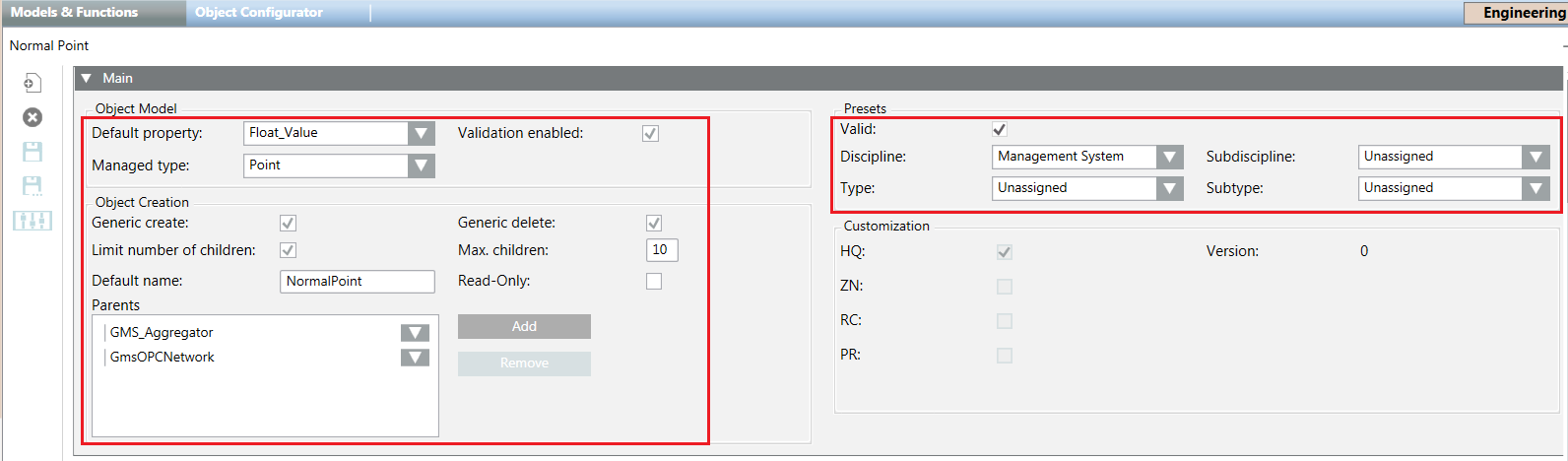
The following image shows the corresponding fields in the Models & Functions tab:
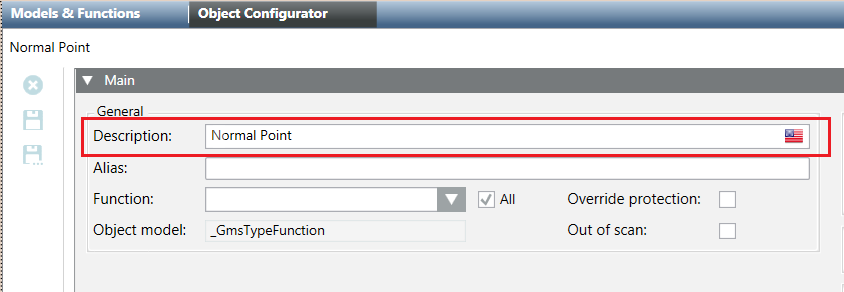
The following image shows the corresponding fields in the Object Configurator tab:
All the configuration data described here is ignored if the Name of the Data Point Type is an asterisk (“*”), because this name does not identify a Data Point Type but a set of mandatory Data Point Elements.
During the first import, if the previous configuration data is not present in the JSON file, the default values are assumed.
In the subsequent re-import, if one configuration data is not present in the file, the value is not changed.
The JSON file can contain data to configure a Data Point Element. It is possible to specify the following:
Data Point Element Configuration Data | ||
Data | Use | Description |
Description | Optional | List of values used as descriptions of the WinCC OA object model. Each value must contain the following data:
The empty list (“Description”: [ ]) resets the description, while the name of the DPE is assumed as default description. |
VL | Optional | True to enable the Value log (history). |
AL | Optional | True to enable the Activity log. |
DL0 | Optional | True to enable Display Level 0. |
DL1 | Optional | True to enable Display Level 1 (Status and Commands window). |
DL2 | Optional | True to enable Display Level 2 (Operation tab). |
DL3 | Optional | True to enable Display Level 3 (Extended Operation tab). |
GroupId | Optional | String representing the property group. For details about the acceptable values, see Table Group ID Values. The empty string (“GroupId”: “”) sets the value as “Invalid”. |
Persist | Optional | True if the value of the property must be persisted in the database any time its value changes. |
Display | Optional | Object containing the display data for the data point element. For details, see Table Display Data. The empty object (“Display”: { }) resets the display data. |
GmsType |
| An object representing the GMS Type configuration data. This object must contain the GmsType element describing the GMS Type of the property. For details about the acceptable values, see Table GMSType. |
It is also possible to extend the PvssType object of a data point element (see Table Data Point Element Data – PvssType) in order to specify:
- The Normal Value of the property and its display status, adding the Status object (see Table Status Object).
- The array attributes, only in case the PvssType specified is one of the supported arrays, adding the ArrayAttributes object (see Table ArrayAttributes Object).
Status Object
The Status object must contain the following:
Data Point Element Status | ||
Data | Use | Description |
Stat | Optional | True to enable the off-normal status. If the flag is false, the Normal Value is ignored. |
DisplOffNormal | Optional | True to display off-normal values only. |
NormalValue | Optional | Normal value of the DPE. The specified value must follow the specified PvssType. In particular:
For all the other PvssType, the Normal Value is not applicable, and it is ignored. In case of set types, the Normal Value can be specified for each element of the set. |
ArrayAttributes Object
The ArrayAttributes object must contain the following:
Data Point Element ArrayAttributes | ||
Data | Use | Description |
Valid | Optional | Validity flag. If false, the display data is set but considered invalid. |
TextGroup | Optional | The name of the text group. The empty string (“TextGroup”: “”) resets the text group. |
Group ID Values | |
GroupId String | Description |
INVALID | Invalid |
STATUS | Status group |
CONFIG | Configuration group |
DIAGNOSTIC | Diagnostic group |
OWNERSHIP | Ownership group |
Display Data | ||
Data | Use | Description |
Valid | Optional | Validity flag. If false, the display data is set but considered invalid. |
Icon | Optional | Object containing the data of the icon library and icon to be used to represent the property. For details, see Table Icon Data. The empty object (“Icon”: { }) resets the icon. |
Icon Data | ||
Data | Use | Description |
Library | Optional | Name of the library that contains the icon to be used to represent the property. If the string is empty (“Library”: “”) the icon is ignored. NOTE: If the Library or the Name are empty (it is enough that only one of them is empty) the icon is ignored. |
Name | Optional | Name of the icon to be used to represent the property. If the string is empty (“Name”: “”), the icon is ignored. NOTE 1: If the Library or the Name are empty (it is enough that only one of them is empty), the icon is ignored. NOTE 2: The icon name must contain the file extension (for example: “.png”, “.ico”, and so on). If the extension is not specified, “.png” is assumed. |
Example:
{
"DPTData": {
"DPTS": [
{
"Name": "*",
"DPES": [
{ "Name": "MyMandatoryFields", "PvssType": { "PvssType": "REF", "Ref": "_GmsMyMandatoryFields" } }
]
},
{
"Name": "Test_NormalPoint",
"Description": [ { "Culture": "en-US", "Text": "Normal Point" } ],
"ManagedType": 0,
"DefaultProp": "Float_Value",
"Validation": true,
"GenericCreate": true,
"GenericDelete": true,
"MaxChildren": 10,
"ChildName": "NormalPoint",
"ChildNameReadOnly": false,
"ParentTypes": [ "GMS_Aggregator", "GmsOPCNetwork" ],
"Classification": {
"Disc": 0,
"SubDisc": 0,
"Type": 0,
"SubType": 0
},
"DPES": [
{
"Name": "Char_Value",
"PvssType": {
"PvssType": "CHAR",
"Status": {
"Stat": true,
"DisplOffNormal": true,
"NormalValue": 101
}
},
"VL": true,
"AL": true,
"DL0": true,
"DL1": true,
"DL2": false,
"DL3": false,
"Persist": true,
"GroupId": "CONFIG",
"Description": [ { "Culture": "en-US", "Text": "Char Value" } ],
"Display": {
"Valid": true,
"Icon": {
"Library": "Global_Base_HQ_1",
"Name": "Op_DP_Generic_None_001.png"
}
},
"GmsType": { "GmsType": "GMSUINT" }
},
{
"Name": "UInt_Value",
"PvssType": { "PvssType": "UINT" },
"VL": true,
"AL": true,
"DL0": false,
"DL1": false,
"DL2": true,
"DL3": true,
"Persist": true,
"GroupId": "CONFIG",
"Description": [ { "Culture": "en-US", "Text": "Unsigned Value" } ],
"Display": {
"Valid": true,
"Icon": {
"Library": "Global_Base_HQ_1",
"Name": "Op_DP_Generic_None_001.png"
}
}
},
{
"Name": "Enum_Value",
"PvssType": { "PvssType": "UINT" },
"VL": true,
"AL": true,
"Persist": true,
"GroupId": "CONFIG",
"Description": [ { "Culture": "en-US", "Text": "Enum Value" } ],
"Display": {
"Valid": true,
"Icon": {
"Library": "Global_Base_HQ_1",
"Name": "Op_DP_Generic_None_001.png"
}
}
},
{
"Name": "Int_Value",
"PvssType": { "PvssType": "INT" },
"VL": true,
"AL": true,
"Persist": true,
"GroupId": "CONFIG",
"Description": [ { "Culture": "en-US", "Text": "Integer Value" } ],
"Display": {
"Valid": true,
"Icon": {
"Library": "Global_Base_HQ_1",
"Name": "Op_DP_Generic_None_001.png"
}
}
},
{
"Name": "Float_Value",
"PvssType": { "PvssType": "FLOAT" },
"VL": true,
"AL": true,
"Persist": true,
"GroupId": "CONFIG",
"Description": [ { "Culture": "en-US", "Text": "Real Value" } ],
"Display": {
"Valid": true,
"Icon": {
"Library": "Global_Base_HQ_1",
"Name": "Op_DP_Generic_None_001.png"
}
}
},
{
"Name": "Bool_Value",
"PvssType": { "PvssType": "BOOL" },
"VL": true,
"AL": true,
"Persist": true,
"GroupId": "CONFIG",
"Description": [ { "Culture": "en-US", "Text": "Bool Value" } ],
"Display": {
"Valid": true,
"Icon": {
"Library": "Global_Base_HQ_1",
"Name": "Op_DP_Generic_None_001.png"
}
}
},
{
"Name": "Bit32_Value",
"PvssType": { "PvssType": "BIT" },
"VL": true,
"AL": true,
"Persist": true,
"GroupId": "CONFIG",
"Description": [ { "Culture": "en-US", "Text": "BitString Value" } ],
"Display": {
"Valid": true,
"Icon": {
"Library": "Global_Base_HQ_1",
"Name": "Op_DP_Generic_None_001.png"
}
}
},
{
"Name": "Duration_Value",
"PvssType": { "PvssType": "UINT" },
"VL": true,
"AL": true,
"Persist": true,
"GroupId": "CONFIG",
"Description": [ { "Culture": "en-US", "Text": "Duration Value" } ],
"Display": {
"Valid": true,
"Icon": {
"Library": "Global_Base_HQ_1",
"Name": "Op_DP_Generic_None_001.png"
}
}
}
]
},
{
"Name": "Test_PointWithArray",
"Description": [ { "Culture": "en-US", "Text": "Point with Array" } ],
"ManagedType": 0,
"DefaultProp": "ArrChar_Value",
"Validation": true,
"GenericCreate": true,
"GenericDelete": true,
"MaxChildren": 4294967295,
"ChildName": "PointWithArray",
"ChildNameReadOnly": false,
"ParentTypes": [ "GMS_Aggregator" ],
"Classification":
{
"Valid": true,
"Disc": 0,
"SubDisc": 0,
"Type": 0,
"SubType": 0
},
"DPES": [
{ "Name": "ArrChar_Value", "PvssType": { "PvssType": "ARRAYCHAR" } },
{
"Name": "ArrUInt_Value",
"PvssType": {
"PvssType": "ARRAYUINT",
"Status": {
"Stat": true,
"DisplOffNormal": true,
"NormalValue": 100
},
"ArrayAttributes": {
"Valid" : true,
"TextGroup" : "TxG_Status"
}
},
},
{ "Name": "ArrInt_Value", "PvssType": { "PvssType": "ARRAYINT" } },
{ "Name": "ArrFloat_Value", "PvssType": { "PvssType": "ARRAYFLOAT" } }
]
}
]
}
}
GMSType
It is also possible to specify the GmsType of the property. For details about the acceptable values, see the following table.
GMSType Values | |
GmsType String | Description |
GMSBOOL | GmsBool type |
GMSINT | GmsInt type |
GMSUINT | GmsUint type |
GMSREAL | GmsReal type |
GMSENUM | GmsEnum type |
GMSBITSTRING | GmsBitString type |
GMSDATETIME | GmsDateTime type |
GMSDURATION | GmsDuration type |
GMSNONE | No GMS type is set. |
The types GmsAny and GmsApplSpecific are not supported.
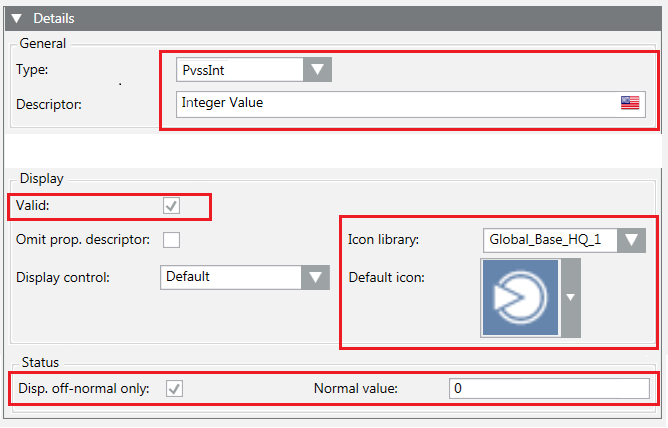
The following image shows the corresponding fields in the Models & Functions tab:

According to the GmsType, it is possible to configure specific data. For details, see the following sections.
During the first import, if the previous configuration data is not present in the JSON file, the default values are assumed. In the subsequent re-import, if a configuration data is not present in the file the value is not changed. This is valid also for the specific data related to the different GmsTypes.
GmsBool Configuration
GmsBool Configuration Data | ||
Data | Use | Description |
GmsType | Mandatory | GMSBOOL |
Attributes | Optional | Object containing the attributes of the property. For details, see Table GmsBool Attributes. The empty object (“Attributes”: { }) resets the attributes data. |
GmsBool Attributes | ||
Data | Use | Description |
Valid | Optional | Validity flag. If false, the display data is set but is considered invalid. |
TextGroup | Optional | The name of the text group to be used for the texts corresponding to the values 0 (false) and 1 (true). The empty string (“gTextGroup”: “”) reset the text group. |
Example:
{
"Name": "Bool_Value",
"PvssType": { "PvssType": "BOOL" },
"VL": true,
"AL": true,
"Persist": true,
"GroupId": "CONFIG",
"Description": [ { "Culture": "en-US", "Text": "Bool Value" } ],
"Display": {
"Valid": true,
"Icon": {
"Library": "Global_Base_HQ_1",
"Name": "Op_DP_Generic_None_001.png"
}
},
"GmsType": {
"GmsType": "GMSBOOL",
"Attributes": {
"Valid": true,
"TextGroup": "TxG_NoYes"
}
}
}
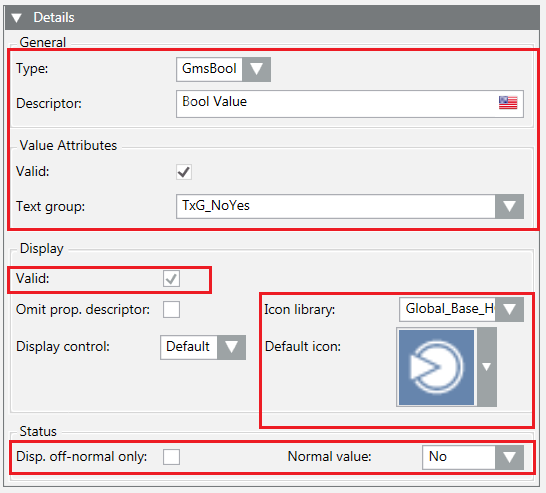
The following image shows the corresponding fields in the Models & Functions tab:
GmsInt Configuration
GmsInt Type Configuration Data | ||
Data | Use | Description |
GmsType | Mandatory | GMSINT |
Attributes | Attributes | Object containing the attributes of the property. For details, see Table GmsInt Attributes. The empty object (“Attributes”: { }) resets the attributes data. |
GmsInt Attributes | ||
Data | Use | Description |
Valid | Optional | Validity flag. If false, the display data is set but considered invalid. |
Properties | Optional | Object containing the valid range values. For details, see Table GmsInt Properties. If the object is empty (“Properties”: { }), the range values are reset, and the range is |
UnitText | Optional | Object containing the engineering unit data. For details, see Table Engineering Unit. If the object is empty (“UnitText”: { }), the engineering unit is reset. |
GmsInt Properties | ||
Data | Use | Description |
Min | Optional | Min value. |
Max | Optional | Max value. |
Since the GmsInt can be based either on PvssInt or PvssChar, the values Min and Max must respect the following limits:
- In case of PvssInt: -2147483648 ÷ 2147483647
- In case of PvssChar: -128 ÷ 127
Engineering Unit | ||
Data | Use | Description |
TextGroup | Optional | Unit Text Group containing the specified engineering unit. NOTE: If the TextGroup string or Unit string are empty (it is enough that only one of them is empty), the engineering unit is ignored. |
Unit | Optional | String representing the engineering unit. NOTE: If the TextGroup string or Unit string are empty (it is enough that only one of them is empty), the engineering unit is ignored. |
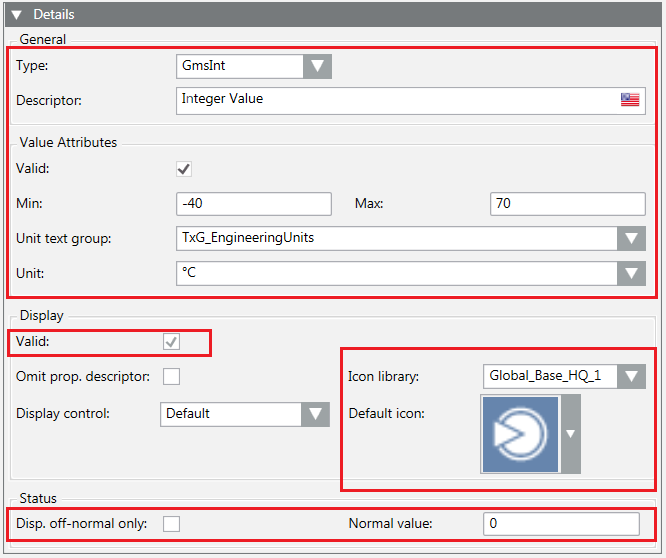
Example:
{
"Name": "Int_Value",
"PvssType": { "PvssType": "INT" },
"VL": true,
"AL": true,
"Persist": true,
"GroupId": "CONFIG",
"Description": [ { "Culture": "en-US", "Text": "Integer Value" } ],
"Display": {
"Valid": true,
"Icon": {
"Library": "Global_Base_HQ_1",
"Name": "Op_DP_Generic_None_001.png"
}
},
"GmsType": {
"GmsType": "GMSINT",
"Attributes”: {
"Valid": true,
"UnitText": {
"Unit": "°C",
"TextGroup": "TxG_EngineeringUnits"
},
"Properties”: {
"Min": -40,
"Max": 70
}
}
}
}
The following image shows the corresponding fields in the Models & Functions tab:
GmsUint Configuration
GmsUint Type Configuration Data | ||
Data | Use | Description |
GmsType | Mandatory | GMSUINT |
Attributes | Optional | Object containing the attributes of the property. For details, see Table GmsUint Attributes. The empty object (“Attributes”: { }) resets the attributes data. |
GmsUint Attributes | ||
Data | Use | Description |
Valid | Optional | Validity flag. If false, the display data is set but considered invalid. |
Properties | Optional | Object containing the valid range values. For details, see Table GmsUint Properties. If the object is empty (“Properties”: { }), the range values are reset, and the range is |
UnitText | Optional | Object containing the engineering unit data. For details, see Table Engineering Unit. If the object is empty (“UnitText”: { }), the engineering unit is reset. |
GmsUint Properties | ||
Data | Use | Description |
Min | Optional | Min value. |
Max | Optional | Max value. |
Since the GmsUint can be based either on PvssUint or PvssChar, the values Min and Max must respect the following limits:
- In case of PvssUInt: 0 ÷ 4294967295
- In case of PvssChar: 0 ÷ 255
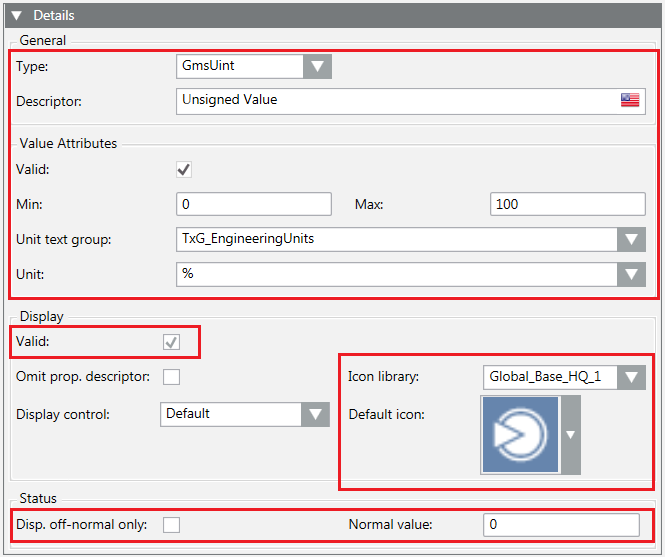
Example:
{
"Name": "UInt_Value",
"PvssType": { "PvssType": "UINT" },
"VL": true,
"AL": true,
"Persist": true,
"GroupId": "CONFIG",
"Description": [ { "Culture": "en-US", "Text": "Unsigned Value" } ],
"Display": {
"Valid": true,
"Icon": {
"Library": "Global_Base_HQ_1",
"Name": "Op_DP_Generic_None_001.png"
}
},
"GmsType": {
"GmsType": "GMSUINT",
"Attributes”: {
"Valid”: true,
"Properties”: {
"Min": 0,
"Max": 100
},
"UnitText": {
"Unit": "%",
"TextGroup": "TxG_EngineeringUnits"
}
}
}
}
The following image shows the corresponding fields in the Models & Functions tab:
GmsReal Configuration
GmsReal Configuration Data | ||
Data | Use | Description |
GmsType | Optional | GMSREAL |
Attributes | Optional | Object containing the attributes of the property. For details, see the table GmsReal Attributes. The empty object (“Attributes”: { }) resets the attributes data. |
GmsReal Attributes | ||
Data | Use | Description |
Valid | Optional | Validity flag. If false, the display data is set but considered invalid. |
Properties | Optional | Object containing the valid range values and the resolution. For details, see Table GmsReal Properties. If the object is empty (“Properties”: { }), the values are reset: the range is |
UnitText | Optional | Object containing the engineering unit data. For details, see Table Engineering Unit. If the object is empty (“UnitText”: { }), the engineering unit is reset. |
GmsReal Properties | ||
Data | Use | Description |
Min | Optional | Min value. The value must be expressed according to the CultureInfo.InvariantCulture. |
Max | Optional | Max value. The value must be expressed according to the CultureInfo.InvariantCulture. |
Res | Optional | Resolution. The max value for the resolution is 16. |
Example:
{
"Name": "Float_Value",
"PvssType": { "PvssType": "FLOAT" },
"VL": true,
"AL": true,
"Persist": true,
"GroupId": "CONFIG",
"Description": [ { "Culture": "en-US", "Text": "Real Value" } ],
"Display": {
"Valid": true,
"Icon": {
"Library": "Global_Base_HQ_1",
"Name": "Op_DP_Generic_None_001.png"
}
},
"GmsType": {
"GmsType": "GMSREAL",
"Attributes”: {
"Valid”: true,
"UnitText": {
"Unit": "KWh",
"TextGroup": "TxG_EngineeringUnits"
},
"Properties": {
"Min": 0.00,
"Max": 100.00,
"Res": 2
}
}
}
}
The following image shows the corresponding fields in the Models & Functions tab:

GmsEnum Configuration
GmsEnum Configuration Data | ||
Data | Use | Description |
GmsType | Mandatory | GMSENUM |
Attributes | Optional | Object containing the attributes of the property. For details, see Table GmsEnum Attributes. The empty object (“Attributes”: { }) resets the attributes data. |
GmsEnum Attributes | ||
Data | Use | Description |
Valid | Optional | Validity flag. If false, the display data is set but considered invalid. |
Properties | Optional | Object containing the valid range values. For details, see Table GmsEnum Properties. If the object is empty (“Properties”: { }), the range values are reset, while the range is |
TextGroup | Optional | Name of the text group to be used for the texts corresponding to the enumerative. If the string is empty (“TextGroup”: “”), the value is reset. |
GmsEnum Properties | ||
Data | Use | Description |
Min | Optional | Min value. |
Max | Optional | Max value. |
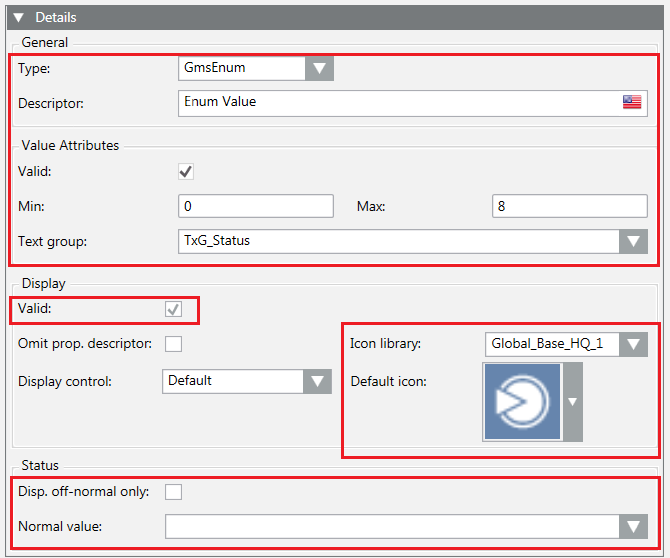
Example:
{
"Name": "Enum_Value",
"PvssType": { "PvssType": "UINT" },
"VL": true,
"AL": true,
"Persist": true,
"GroupId": "CONFIG",
"Description":[{"Culture":"en-US", "Text":"Enum Value"}],
"Display": {
"Valid": true,
"Icon": {
"Library": "Global_Base_HQ_1",
"Name": "Op_DP_Generic_None_001.png"
}
},
"GmsType": {
"GmsType": "GMSENUM",
"Attributes": {
"Valid": true,
"Properties": {
"Min": 0,
"Max": 8
},
"TextGroup": "TxG_Status"
}
}
}
The following image shows the corresponding fields in the Models & Functions tab:
GmsBitString Configuration
GmsBitString Configuration Data | ||
Data | Use | Description |
GmsType | Mandatory | GMSBITSTRING |
Attributes | Optional | Object containing the attributes of the property. For details, see Table GmsBitString Attributes. The empty object (“Attributes”: { }) resets the attributes data. |
GmsBitString Attributes | ||
Data | Use | Description |
Valid | Optional | Validity flag. If false, the display data is set but considered invalid. |
Properties | Optional | Object containing the valid range values. For details, see Table GmsBitString Properties. If the object is empty (“Properties”: { }), the range values are reset. |
TextGroup | Optional | Name of the text group to be used. If the string is empty (“TextGroup”: “”), the value is reset. |
SecondTextGroup | Optional | Name of the secondary text group to be used. If the string is empty (“SecondaryTextGroup”: “”), the value is reset. |
GmsBitString Attributes | ||
Data | Use | Description |
FirstBit | Optional | Index of the first bit to be used (from 0 to 31). |
LastBit | Optional | Index of the last bit to be used (from 0 to 31). |
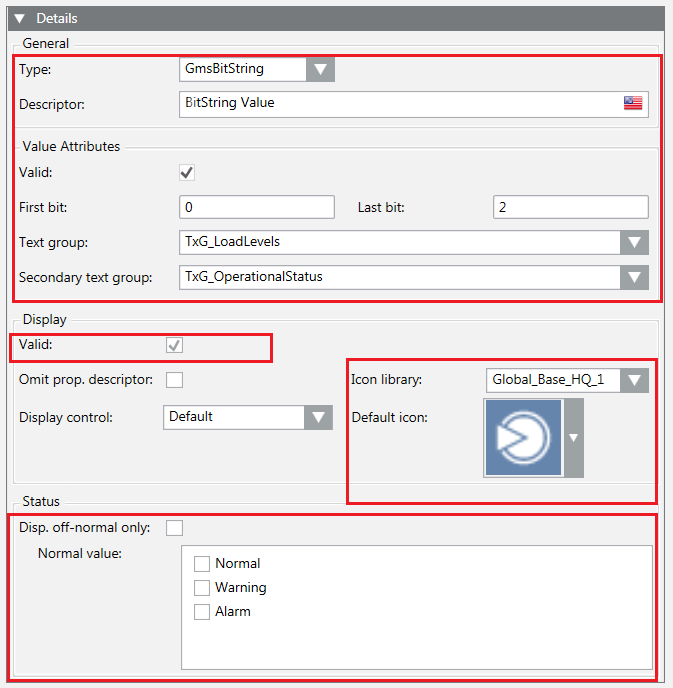
Example:
{
"Name": "Bit32_Value",
"PvssType": { "PvssType": "BIT" },
"VL": true,
"AL": true,
"Persist": true,
"GroupId": "CONFIG",
"Description": [ { "Culture": "en-US", "Text": "BitString Value" } ],
"Display": {
"Valid": true,
"Icon": {
"Library": "Global_Base_HQ_1",
"Name": "Op_DP_Generic_None_001.png"
}
},
"GmsType": {
"GmsType": "GMSBITSTRING",
"Attributes":
{
"Valid": true,
"Properties": {
"FirstBit": 0,
"LastBit": 2
},
"TextGroup": "TxG_LoadLevels",
"SecondTextGroup": "TxG_OperationalStatus"
}
}
}
The following image shows the corresponding fields in the Models & Functions tab:
GmsDateTime Configuration
GmsDateTime Configuration Data | ||
Data | Use | Description |
GmsType | Mandatory | GMSDATETIME |
Attributes | Optional | Object containing the attributes of the property. For details, see Table GmsDateTime Attributes. The empty object (“Attributes”: { }) resets the attributes data. |
GmsDateTime Attributes | ||
Data | Use | Description |
Valid | Optional | Validity flag. If false, the display data is set but considered invalid. |
Properties | Optional | Object containing the valid properties. For details, see Table GmsDateTime Properties. If the object is empty (“Properties”: { }), the values are set to false. |
TimeDetail | Optional | String representing the time detail. For details about the acceptable values, see Table TimeDetail Values. If the string is empty (“TimeDetail”: “”), the value is set to |
TimeRes | Optional | String representing the time resolution. For details about the acceptable values, see Table TimeRes Values. If the string is empty (“TimeRes”: “”), the value is set to |
GmsDateTime Properties | ||
Data | Use | Description |
AllowDayOfWeek | Optional | True to allow the day of the week representation. |
AllowWildcards | Optional | True to allow the use of wildcards. |
TimeDetail Values | |
Data | Description |
NONE | Nothing valid. |
DATE | Property that contains a value representing a date. |
TIME | Property that contains a value representing a time. |
DATETIME | Property that contains a value representing a date and a time. |
TimeRes Values | |
Data | Description |
SEC | Property that contains a time value with a resolution for the seconds display. |
10TH | Property that contains a time value with a resolution of the 10th seconds. |
100TH | Property that contains a time value with a resolution of the 100th seconds. |
Example:
{
"Name": "String_Value",
"PvssType": { "PvssType": "STRING" },
"VL": true,
"AL": true,
"Persist": true,
"GroupId": "CONFIG",
"Description": [ { "Culture": "en-US", "Text": "DateTime Value" } ],
"Display": {
"Valid": true,
"Icon": {
"Library": "Global_Base_HQ_1",
"Name": "Op_DP_Generic_None_001.png"
}
},
"GmsType": {
"GmsType": "GMSDATETIME",
"Attributes": {
"Valid": true,
"Properties": {
"AllowDayOfWeek": true,
"AllowWildcards": true
},
"TimeDetail": "DATETIME",
"TimeRes": "SEC"
}
}
}
The following image shows the corresponding fields in the Models & Functions tab:

GmsDuration Configuration
GmsDuration Configuration Data | ||
Data | Use | Description |
GmsType | Mandatory | GMSDURATION |
Attributes | Optional | Object containing the attributes of the property. For details, see Table GmsDuration Attributes. The empty object (“Attributes”: { }) resets the attributes data. |
GmsDuration Attributes | ||
Data | Use | Description |
Valid | Optional | Validity flag. If false, the display data is set but considered invalid. |
Properties | Optional | Object containing the valid range values. For details, see Table GmsDuration Properties. If the object is empty (“Attributes”: { }), the range values are reset, while the range is |
DurationUnit | Optional | String representing the measurement unit of the property value. For details about the acceptable values, see Table DurationUnit Values. If the string is empty (“DurationUnit”: “”), the value is set to |
DurationRes | Optional | String representing the resolution of the property value. For details about the acceptable values, see Table DurationRes Values. If the string is empty (“DurationRes”: “”), the value is set to |
GmsDuration Properties | ||
Data | Use | Description |
Min | Optional | Min value. |
Max | Optional | Max value. |
DurationUnit Values | |
Data | Description |
DAY | Day |
HOUR | Hour |
MIN | Min |
SEC | Sec |
DSEC | Decimal Sec |
CSEC | Centi Sec |
MSEC | Milli Sec |
DurationRes Values | |
Data | Description |
D | Day |
DH | Day-Hour |
DHM | Day-Hour-Min |
DHMS | Day-Hour-Min-Sec |
DHMSM | Day-Hour-Min-Sec-Ms |
H | Hour |
HM | Hour-Min |
HMS | Hour-Min-Sec |
HMSM | Hour-Min-Sec-Ms |
M | Min |
MS | Min-Sec |
MSM | Min-Sec-Ms |
S | Sec |
SM | Sec-Ms |
Example:
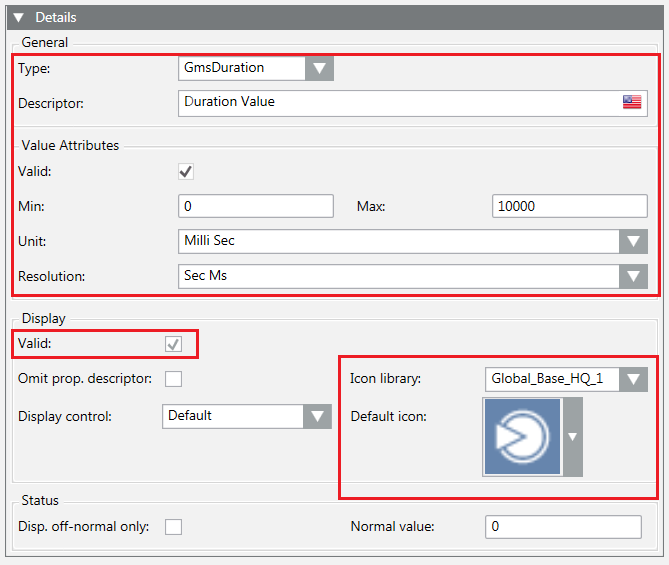
{
"Name": "Duration_Value",
"PvssType": { "PvssType": "UINT" },
"VL": true,
"AL": true,
"Persist": true,
"GroupId": "CONFIG",
"Description":[{"Culture":"en-US", "Text":"Duration Value"}],
"Display": {
"Valid": true,
"Icon": {
"Library": "Global_Base_HQ_1",
"Name": "Op_DP_Generic_None_001.png"
}
},
"GmsType": {
"GmsType": "GMSDURATION",
"Attributes”: {
"Valid": true,
"Properties”: {
"Min": 0,
"Max": 10000
},
"DurationUnit": "MSEC",
"DurationRes": "SM"
}
}
}
The following image shows the corresponding fields in the Models & Functions tab:
GmsNone Configuration
GmsNone Configuration Data | ||
Data | Use | Description |
GmsType | Mandatory | GMSNONE |
The GMSNONE type is a special type used during the re-import of an object model in case it is necessary to remove the configuration of the GmsType previously made and restore the original PvssType.
The GMSNONE type is ignored in case an object model is created for the first time.
The following example shows how to use GMSNONE for configuring a data point previously configured as a GmsBool. After the re-import, the type of the “Bool_Value” is “PvssBool”.
{
"Name": "Bool_Value",
"PvssType": { "PvssType": "BOOL" },
"VL": true,
"AL": true,
"Persist": true,
"GroupId": "CONFIG",
"Description": [ { "Culture": "en-US", "Text": "Bool Value" } ],
"Display": {
"Valid": true,
"Icon": {
"Library": "Global_Base_HQ_1",
"Name": "Op_DP_Generic_None_001.png"
}
},
"GmsType": {
"GmsType": "GMSNONE"
}
}
If a Data Point Element is of reference type, the resulting Data Point Type will contain all the properties (DPEs) of the referenced type.
In this case, it is not necessary that the JSON file contains the definition of the referenced type. Anyway, it can be necessary to configure some of these properties (DPEs).
To configure the properties of the referenced Data Point Types, the JSON file must contain an element (property) named REFS with an element named DPTS that is a list of the referenced Data Point Types with the configuration of their properties.
Example:
{
"DPTData": {
"DPTS": [ ...<list of DPTs description>...]
},
"REFS": {
"DPTS": [ ...<list of Referenced DPTs configuration>...]
}
}
For each referenced Data Point Type, it is necessary to specify the following:
Referenced Data Point Type Data | ||
Data | Use | Description |
Name | Mandatory | Name of the referenced Data Point Type. |
DPES | Mandatory | List of Data Point Elements. Only the properties that must be configured are defined in the file. |
Example:
{
"DPTData": {
"DPTS": [ ...<list of DPTs description>...]
},
"REFS": {
"DPTS": [
{ "Name": "_GmsMyMandatoryFields",
"DPES": [
{ "Name": "MandatoryText", "PvssType": { "PvssType": "STRING"},
"VL": true, "AL": true,
"Persist": true, "GroupId": "CONFIG",
"Description":[{"Culture":"en-US", "Text":"Mandatory Text"}],
"Display": {
"Valid": true,
"Icon": {
"Library": "Global_Base_HQ_1",
"Name": "Op_DP_Generic_None_001.png"
}
}
}
]
}
]
}
}
The configuration of the Data Point Elements is the same as described in section Data Point Element.
The configuration of a referenced Data Point Type is applied to all the Data Point Types (defined in the JSON file) that reference the referenced Data Point Type.
As the references to _GmsRelatedItems and _GmsStatusPropagation are automatically added during the import if not present in the JSON file, it is not necessary to configure them in the JSON file. Those referenced DPTs contain internal properties that do not require any configuration. Only the property AggregatedSummaryStatus will be automatically configured during the import. If it is necessary to set different values for the property AggregatedSummaryStatus, the reference _GmsStatusPropagation must be added into the Data Point Type definition in the JSON file, and the configuration of the property must be added to the REFS element.
The JSON file can also contain the text groups definition. In this case, the text groups will be created before the object models are created and configured.
To define the text groups and their elements, the JSON file must contain an element (property) named TGSData with an element named TGS that is a list of the text groups.
Example:
{
"DPTData": {
"DPTS": [ ...<list of DPTs description>... ]
},
"REFS": {
"DPTS": [ ...<list of Referenced DPTs configuration>... ]
},
"TGSData": {
"TGS": [...<list of text groups configuration>... ]
}
}
For each text group, it is necessary to specify the following:
Text Group Data | ||
Data | Use | Description |
Name | Mandatory | Name of the text group. |
Description | Optional | List of the values used as CNS descriptions of the text group. Each value must contain the following data:
The empty list (“Description”: [ ]) resets the description, while the name of the text group is assumed as default description. |
TGElems | Mandatory | List of texts. |
Each text must contain the following:
Text Data | ||
Data | Use | Description |
Id | Mandatory | Text identifier. |
Text | Mandatory | List of text values. Each value must contain the following data:
|
In case of a re-import, the text groups and the text values are not deleted. It is only possible to add new text values or change the previously imported ones.
Example:
{
"DPTData": {
"DPTS": [ ...<list of DPTs description>... ]
},
"REFS": {
"DPTS": [ ...<list of Referenced DPTs configuration>... ]
},
"TGSData": {
"TGS": [
{ "Name": "MyText",
"Description": [ { "Culture": "en-US", "Text": "My Text Group"} ],
"TGElems":[
{ "Id": 1,
"Text": [
{ "Culture": "en-US", "Text": "Text 1" },
{ "Culture": "it-IT", "Text": "Testo 1" }
]
},
{ "Id": 2,
"Text": [
{ "Culture": "en-US", "Text": "Text 2" },
{ "Culture": "it-IT", "Text": "Testo 2" }
]
},
{ "Id": 3,
"Text": [
{ "Culture": "en-US", "Text": "Text 3" },
{ "Culture": "it-IT", "Text": "Testo 3" }
]
}
]
}
]
}
}
The following is a complete example of a JSON file in which Data Point Types are imported and the corresponding Type Function (object model) is configured.
The following sample is to be intended as an example of file and not as a template. If you want to make a copy of it and create your own file to import, verify its content carefully and enter the data point types that you want to create. In particular, pay attention to the mandatory DPEs section.
{
"DPTData": {
"DPTS": [
{
"Name": "*",
"DPES": [
{ "Name": "MyMandatoryFields", "PvssType": { "PvssType": "REF", "Ref": "_GmsMyMandatoryFields" } }
]
},
{
"Name": "Test_NormalPoint",
"Description": [ { "Culture": "en-US", "Text": "Normal Point" } ],
"ManagedType": 0,
"DefaultProp": "Float_Value",
"Validation": true,
"GenericCreate": true,
"GenericDelete": true,
"MaxChildren": 10,
"ChildName": "NormalPoint",
"ChildNameReadOnly": false,
"ParentTypes": [ "GMS_Aggregator", "GmsOPCNetwork" ],
"Classification": {
"Valid": true,
"Disc": 0,
"SubDisc": 0,
"Type": 0,
"SubType": 0
},
"DPES": [
{
"Name": "Char_Value",
"PvssType": {
"PvssType": "CHAR",
"Status": {
"Stat": true,
"DisplOffNormal": true,
"NormalValue": 101
}
},
"VL": true,
"AL": true,
"DL0": true,
"DL1": true,
"DL2": false,
"DL3": false,
"Persist": true,
"GroupId": "CONFIG",
"Description": [ { "Culture": "en-US", "Text": "Char Value" } ],
"Display": {
""Valid": true,
"Icon": {
"Library": "Global_Base_HQ_1",
"Name": "Op_DP_Generic_None_001.png"
}
},
"GmsType": { "GmsType": "GMSUINT" }
},
{
"Name": "UInt_Value",
"PvssType": { "PvssType": "UINT" },
"VL": true,
"AL": true,
"DL0": false,
"DL1": false,
"DL2": false,
"DL3": false,
"Persist": false,
"GroupId": "CONFIG",
"Description": [ { "Culture": "en-US", "Text": "Unsigned Value" } ],
"Display": {
"Valid": true,
"Icon": {
"Library": "Global_Base_HQ_1",
"Name": "Op_DP_Generic_None_001.png"
}
},
"GmsType": {
"GmsType": "GMSUINT",
"Attributes": {
"Valid": true,
"Properties": {
"Min": 0,
"Max": 100
},
"UnitText": {
"TextGroup": "TxG_EngineeringUnits",
"Unit": "%"
}
}
}
},
{
"Name": "Enum_Value",
"PvssType": { "PvssType": "UINT" },
"VL": true,
"AL": true,
"Persist": true,
"GroupId": "CONFIG",
"Description": [ { "Culture": "en-US", "Text": "Enum Value" } ],
"Display": {
"Valid": true,
""Icon": {
" "Library": "Global_Base_HQ_1",
"Name": "Op_DP_Generic_None_001.png"
}
},
"GmsType": {
"GmsType": "GMSENUM",
"Attributes":{
"Valid": true,
"Properties": {
"Min": 1,
"Max": 3
},
"TextGroup": "MyText"
}
}
},
{
"Name": "Int_Value",
"PvssType": { "PvssType": "INT" },
"VL": true,
"AL": true,
"Persist": true,
"GroupId": "CONFIG",
"Description": [ { "Culture": "en-US", "Text": "Integer Value" } ],
"Display": {
"Valid": true,
"Icon": {
"Library": "Global_Base_HQ_1",
"Name": "Op_DP_Generic_None_001.png"
}
},
"GmsType": {
"GmsType": "GMSINT",
"Attributes": {
"Valid": true,
"UnitText": {
"TextGroup": "TxG_EngineeringUnits",
"Unit": "°C"
},
"Properties": {
"Min": -40,
"Max": 70
}
}
}
},
{
"Name": "Float_Value",
"PvssType": { "PvssType": "FLOAT" },
"VL": true,
"AL": true,
"Persist": true,
"GroupId": "CONFIG",
"Description": [ { "Culture": "en-US", "Text": "Real Value" } ],
"Display": {
"Valid": true,
"Icon": {
"Library": "Global_Base_HQ_1",
"Name": "Op_DP_Generic_None_001.png"
}
},
"GmsType": {
"GmsType": "GMSREAL",
"Attributes": {
"Valid": true,
"UnitText": {
"TextGroup": "TxG_EngineeringUnits",
"Unit": "KWh"
},
"Properties": {
"Min": 0.00,
"Max": 100.00,
"Res": 2
}
}
}
},
{
"Name": "Bool_Value",
"PvssType": { "PvssType": "BOOL" },
"VL": true,
"AL": true,
"Persist": true,
"GroupId": "CONFIG",
"Description": [ { "Culture": "en-US", "Text": "Bool Value" } ],
"Display": {
"Valid": true,
"Icon": {
"Library": "Global_Base_HQ_1",
"Name": "Op_DP_Generic_None_001.png"
}
},
"GmsType": {
"GmsType": "GMSBOOL",
"Attributes": {
"Valid": true,
"TextGroup": "TxG_NoYes"
}
}
},
{
"Name": "Bit32_Value",
"PvssType": { "PvssType": "BIT" },
"VL": true,
"AL": true,
"Persist": true,
"GroupId": "CONFIG",
"Description": [ { "Culture": "en-US", "Text": "BitString Value" } ],
"Display": {
"Valid": true,
"Icon": {
"Library": "Global_Base_HQ_1",
"Name": "Op_DP_Generic_None_001.png"
}
},
"GmsType": {
"GmsType": "GMSBITSTRING",
"Attributes": {
"Valid": true,
"Properties": {
"FirstBit": 0,
"LastBit": 2
},
"TextGroup": "TxG_LoadLevels",
"SecondTextGroup": "TxG_OperationalStatus"
},
}
},
{
"Name": "Duration_Value",
"PvssType": { "PvssType": "UINT" },
"VL": true,
"AL": true,
"Persist": true,
"GroupId": "CONFIG",
"Description": [ { "Culture": "en-US", "Text": "Duration Value" } ],
"Display": {
"Valid": true,
"Icon": {
"Library": "Global_Base_HQ_1",
"Name": "Op_DP_Generic_None_001.png"
}
},
"GmsType": {
"GmsType": "GMSDURATION",
"Attributes": {
"Valid": true,
"Properties": {
"Min": 0,
"Max": 10000
},
"DurationUnit": "MSEC",
"DurationRes": "SM"
}
}
}
]
},
{
"Name": "Test_PointWithRef",
"Description": [ { "Culture": "en-US", "Text": "Point with Ref" } ],
"ManagedType": 0,
"DefaultProp": "Blob_Value",
"Validation": true,
"GenericCreate": true,
"GenericDelete": true,
"MaxChildren": 1,
"ChildName": "PointWithRef",
"ChildNameReadOnly": true,
"ParentTypes": [ "GMS_Aggregator" ],
"Classification": {
"Valid": true,
"Disc": 0,
"SubDisc": 0,
"Type": 0,
"SubType": 0
},
"DPES": [
{
"Name": "String_Value",
"PvssType": { "PvssType": "STRING" },
"VL": true,
"AL": true,
"Persist": true,
"GroupId": "CONFIG",
"Description": [ { "Culture": "en-US", "Text": "DateTime Value" } ],
"Display": {
"Valid": true,
"Icon": {
"Library": "Global_Base_HQ_1",
"Name": "Op_DP_Generic_None_001.png"
}
},
"GmsType": {
"GmsType": "GMSDATETIME",
"Attributes": {
"Valid": true,
"Properties": {
"AllowDayOfWeek": true,
"AllowWildcards": true
},
"TimeDetail": "DATETIME",
"TimeRes": "SEC"
}
}
},
{ "Name": "Time_Value", "PvssType": { "PvssType": "TIME" } },
{ "Name": "DpId_Value", "PvssType": { "PvssType": "DPID" } },
{ "Name": "LangString_Value", "PvssType": { "PvssType": "LANGSTRING" } },
{ "Name": "Blob_Value", "PvssType": { "PvssType": "BLOB" } },
{ "Name": "Reference_Value", "PvssType": { "PvssType": "REF",
"Ref": "_Gms_TestReference" } }
]
},
{
"Name": "Test_PointWithStruct",
"Description": [ { "Culture": "en-US", "Text": "Point with Struct" } ],
"ManagedType": 0,
"DefaultProp": "Struct_Value.Int_Value",
"Validation": true,
"GenericCreate": true,
"GenericDelete": true,
"MaxChildren": 4294967295,
"ChildName": "PointWithStruct",
"ChildNameReadOnly": false,
"ParentTypes": [ "GMS_Aggregator", "GmsOPCNetwork" ],
"Classification": {
"Valid:": true,
"Disc": 0,
"SubDisc": 0,
"Type": 0,
"SubType": 0
},
"DPES": [
{
"Name": "Struct_Value",
"PvssType": {
"PvssType": "STRUCT",
"DPES": [
{ "Name": "Int_Value", "PvssType": { "PvssType": "INT" } },
{ "Name": "String_Value", "PvssType": { "PvssType": "STRING" } },
{
"Name": "Struct_Internal",
"PvssType": {
"PvssType": "STRUCT",
"DPES": [
{ "Name": "Float_Value", "PvssType": { "PvssType": "FLOAT"} },
{ "Name": "Reference_Value", "PvssType": { "PvssType": "REF",
"Ref": "_Gms_TestReference"} }
]
}
}
]
}
}
]
},
{
"Name": "Test_PointWithArray",
"Description": [ { "Culture": "en-US", "Text": "Point with Array" } ],
"ManagedType": 0,
"DefaultProp": "ArrChar_Value",
"Validation": true,
"GenericCreate": true,
"GenericDelete": true,
"MaxChildren": 4294967295,
"ChildName": "PointWithArray",
"ChildNameReadOnly": false,
"ParentTypes": [ "GMS_Aggregator" ],
"Classification":
{
"Valid": true,
"Disc": 0,
"SubDisc": 0,
"Type": 0,
"SubType": 0
},
"DPES": [
{ "Name": "ArrChar_Value", "PvssType": { "PvssType": "ARRAYCHAR" } },
{
"Name": "ArrUInt_Value",
"PvssType": {
"PvssType": "ARRAYUINT",
"Status": {
"Stat": true,
"DisplOffNormal": true,
"NormalValue": 100
},
"ArrayAttributes": {
"Valid" : true,
"TextGroup" : "TxG_Status"
}
},
},
{ "Name": "ArrInt_Value", "PvssType": { "PvssType": "ARRAYINT" } },
{ "Name": "ArrFloat_Value", "PvssType": { "PvssType": "ARRAYFLOAT" } }
]
},
{
"Name": "Test_PointWithSet",
"Description": [ { "Culture": "en-US", "Text": "Point with Set" } ],
"ManagedType": 0,
"DefaultProp": "SetUint_Value[1]",
"Validation": true,
"GenericCreate": true,
"GenericDelete": true,
"MaxChildren": 4294967295,
"ChildName": "PointWithSet",
"ChildNameReadOnly": false,
"ParentTypes": [ "GMS_Aggregator" ],
"Classification": {
"Valid": true,
""Disc": 0,
""SubDisc": 0,
""Type": 0,
""SubType": 0
},
"DPES": [
{
"Name": "SetChar_Value",
"PvssType": {
"PvssType": "SETCHAR",
"DPES": [
{ "Name": "Char1", "PvssType": { "PvssType": "CHAR" } },
{ "Name": "Char2", "PvssType": { "PvssType": "CHAR" } }
]
}
},
{
"Name": "SetUint_Value",
"PvssType": {
"PvssType": "SETUINT",
"DPES": [
{ "Name": "UInt1", "PvssType": { "PvssType": "UINT" } },
{ "Name": "UInt2", "PvssType": { "PvssType": "UINT" } },
{ "Name": "UInt3", "PvssType": { "PvssType": "UINT" } }
]
}
}
]
}
]
},
"REFS": {
"DPTS": [
{
"Name": "_GmsMyMandatoryFields",
"DPES": [
{
"Name": "MandatoryText",
"PvssType": { "PvssType": "STRING" },
"VL": true,
"AL": true,
"Persist": true,
"GroupId": "CONFIG",
"Description": [ { "Culture": "en-US", "Text": "Mandatory Text" } ],
"Display": {
"Valid": true,
"Icon": {
"Library": "Global_Base_HQ_1",
"Name": "Op_DP_Generic_None_001.png"
}
},
}
]
}
]
},
"TGSData": {
"TGS": [
{ "Name": "MyText",
"Description": [ { "Culture": "en-US", "Text": "My Text Group"} ],
"TGElems":[
{ "Id": 1,
"Text": [
{ "Culture": "en-US", "Text": "Text 1" },
{ "Culture": "it-IT", "Text": "Testo 1" }
]
},
{ "Id": 2,
"Text": [
{ "Culture": "en-US", "Text": "Text 2" },
{ "Culture": "it-IT", "Text": "Testo 2" }
]
},
{ "Id": 3,
"Text": [
{ "Culture": "en-US", "Text": "Text 3" },
{ "Culture": "it-IT", "Text": "Testo 3" }
]
}
]
}
]
}
}
To check the schema for JSON files to be imported to validate the data structure, see the file provided in \\Installation\bin.
The object model importer implements the software interface IObjectModelExport that can be used to export a Data Point Type and the related object model configuration into JSON format.
The interface IObjectModelExport is implemented by the class ObjectModelExport and contains the synchronous methods described below.
The export algorithm invokes the WinCC OA ASCII Manager to retrieve some Data Point Type data, so – by design – this feature can operate only on the server machine where the WinCC OA is installed.

NOTE:
The object model data exported corresponds with the configuration of the higher customization level. This customization level is the one where the object model was originally created and where the object model can be re-imported. For example, if an object model was created at L1-Headquarter and then customized at L4-Project, the object model data exported will be the ones of the L1-Headquarter level.
Initialize
This method initializes the export functionality. This means that it initializes the ObjectModelExport class attributes and creates the classes used to interact with WinCC OA and to trace the logs.
bool Initialize( ContextOperation contextUserOperation,
ContextOperation contextEngineeringOperation,
string clientName,
DpIdentifier systemDp)
The parameters and the returned value of the method are described in the following tables.
Initialize Parameters | ||
Type | Name | Description |
ContextOperation | contextUserOperation | User context operation (normal mode). |
ContextOperation | contextEngineeringOperation | Engineering context operation (internal mode). |
string | clientName | Component name. |
DpIdentifier | systemDp | Current System identifier. |
Initialize Returned Value | |
Type | Description |
bool | False, in case an error occurs during the initialization. |
Export
This method exports a Data Point Type and the related object model configuration.
MemoryStream Export( string objectModel,
string[] textGroups,
out int errorCode,
out string errorLogs)
The parameters and the returned value of the method are described in the following tables.
Export Parameters | ||
Type | Name | Description |
string | objectModel | Name of the object model that must be exported. |
string[ ] | textGroups | Array of text groups names that must be exported. If the array is empty or the parameter is null, no text groups will be exported. |
out int | errorCode | Error code. The possible values are: 0 = no errors. 1 = errors during the export. 2 = warnings during the export. |
out string | errorLogs | String containing the logs of the errors or warnings. |
Export Returned Value | |
Type | Description |
MemoryStream | Stream in memory containing the object model exported into JSON format. |
Example
The following example shows how to use the interface IObjectModelExport.
The library Siemens.Gms.Importer.ObjectModelImporter.dll must be referenced.
public void ExportObjectModel(ContextOperation userContext, ContextOperation engContext,
DpIdentifier systemDpId)
{
ObjectModelExport objectModelExporter = null;
try
{
int errorCode;
string errorLogs;
// Create an instance of the exporter
objectModelExporter = new ObjectModelExport();
// Initialize the exporter
if (!objectModelExporter.Initialize(userContext, engContext, "MyAppl_ObjectModelExport",
systemDpId))
{
MessageBox.Show("Error during initialization.");
return;
}
// Export the object model data
string objectModelName = "Test_NormalPoint";
string[] textGroups = new string[] { "MyText" };
var memoryStream = objectModelExporter.Export(objectModelName, textGroups,
out errorCode, out errorLogs);
// Evaluate the error code
// .......
// Other code
// .......
}
catch(Exception)
{
MessageBox.Show("Generic error during the export.", "Severe Error", MessageBoxButtons.OK,
MessageBoxIcon.Error);
}
finally
{
if(objectModelExporter != null)
{
objectModelExporter.Dispose();
objectModelExporter = null;
}
}
}
Notes About the Object Model Exported into JSON Format
The object model exported data is formatted according to what described for the JSON format.
However, some differences with respect to the JSON import format must be considered:
- All the object model configuration data is exported, regardless of whether this data is mandatory or optional in the import file.
- Similarly, all the configuration data of each Data Point Element is exported, regardless of whether this data is mandatory or optional in the import file.
- The possible mandatory Data Point Elements are listed together with the other DPEs of the object model and are not included into a separate section.
- All the specified text groups are exported, even if they are not used by the exported object model.
- It is not possible to export the text groups only. It is mandatory to specify the object model to export otherwise the export process fails.
- If any Data Point Element of reference type is present, all the data of the referenced object model is exported.
- As each Data Point Type must have references to _GmsRelatedItems and _GmsStatusPropagation, those referenced Data Point Types are not exported.
